
Your first login & tour
Where: your dashboard URL (e.g. dash.tradershubs.com) → Sign inWho: every dashboard user
Signing in
- Open your dashboard URL.
- Enter the email and password of your user account.
- You land on the dashboard home — the overview of your account.
Can't sign in?
Your account is created by the tenant owner or an administrator under Settings → Users. Ask them to check your user record — your POS PIN (if you work a terminal) is a different credential and won't work here.
The layout you'll see everywhere
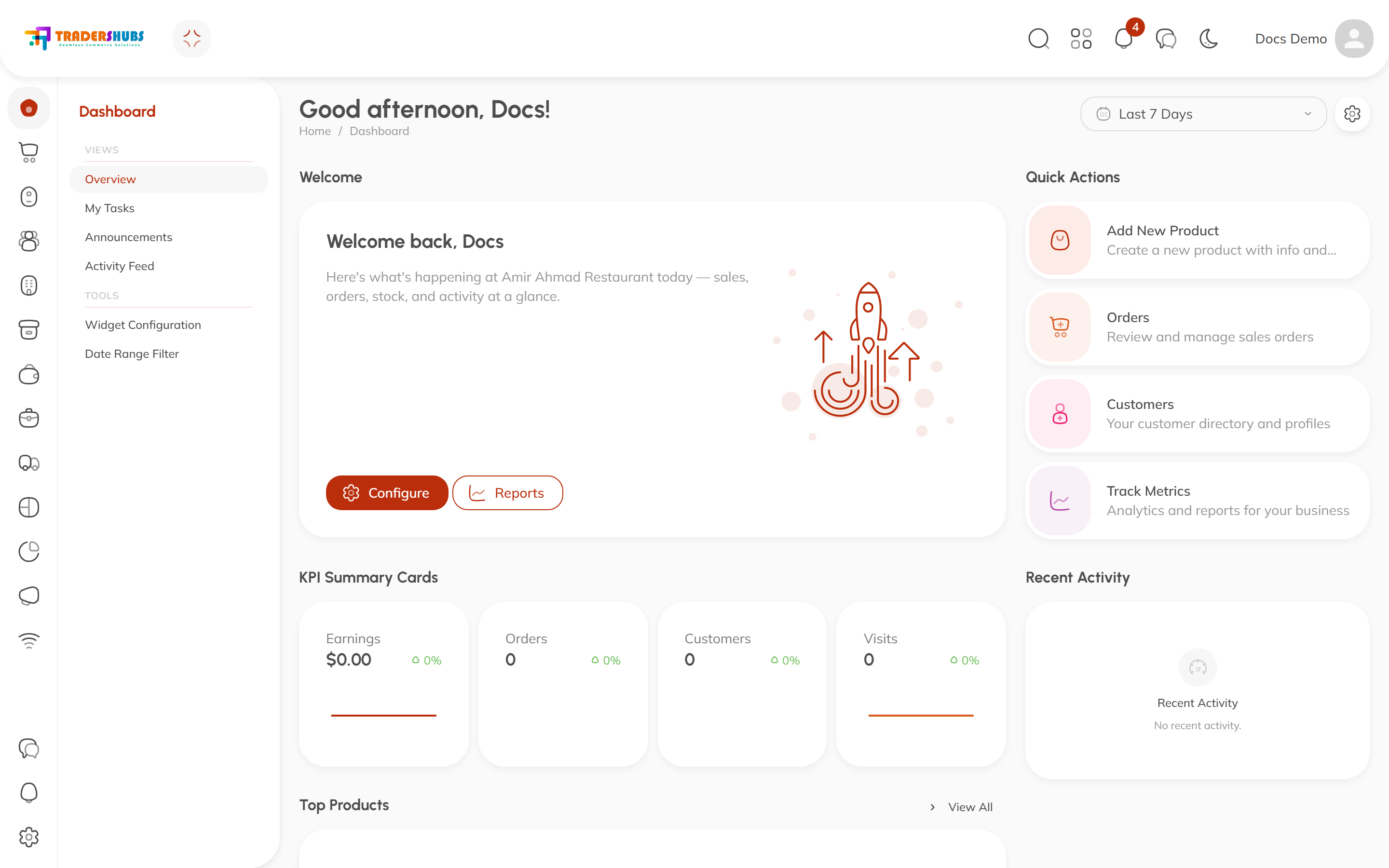
- Left sidebar — the main menu, grouped by module (Orders, Catalog, Customers, Inventory, Finance, Team, POS, Storefront, Logistics, Analytics, Settings). Collapse a group to hide what you don't use.
- Top bar — global search, language, theme, notifications, and your profile menu.
- Content area — every page is either a table (a list you can sort, filter, search and act on) or a form (a focused page for creating or editing one record).
Two habits worth building
- Everything is a table. Almost every list in Tradershubs shares the same powerful behaviors — learn them once in Tables, filters & search.
- Check the overview first. Each module has a dashboard page with the numbers that matter for that area — it's the fastest way to see what needs attention.